使用PAT进行Git免密推送(支持HTTPS)
使用 PAT 进行 Git 免密推送
在日常开发中,每次 git push 都输入账号密码非常繁琐。GitHub 早已禁用密码认证,Gitea、GitLab 等平台也推荐使用 Personal Access Token (PAT) 代替密码进行 HTTPS 操作。本文将介绍如何使用 PAT + credential.helper store 实现免密推送,并说明其工作原理和安全考量。
为什么需要 PAT
2021 年 8 月起,GitHub 不再支持密码认证,所有 HTTPS Git 操作必须使用 PAT 或 SSH Key。原因很简单:密码容易被撞库、泄露,而 PAT 具有以下优势:
- 最小权限:可以指定 Token 仅用于
repo(仓库读写)等特定 scope - 可随时吊销:Token 泄露后可以在平台后台一键撤销,不影响账号密码
- 无 2FA 干扰:即使账号开启了两步验证,PAT 也无需额外验证
其他平台同样推荐此方式——Gitea 从 1.17 开始支持细粒度 Token,GitLab 的 PAT 机制也非常成熟。
credential.helper store 是怎么工作的
git config --global credential.helper store 的作用是:让 Git 将凭据以明文形式永久保存到本地文件中,之后访问远程仓库时自动读取,无需再次输入。
命令拆解
1 | |
| 参数 | 说明 |
|---|---|
git config |
修改 Git 配置 |
--global |
对当前用户生效,写入 ~/.gitconfig |
credential.helper |
Git 的凭据管理器配置项 |
store |
使用 store 方式永久保存凭据 |
工作流程
假设你第一次执行:
1 | |
Git 会提示输入用户名和密码(或 Token),输入后凭据保存到:
1 | |
内容格式为:
1 | |
之后执行 git pull、git push、git fetch 等操作时,Git 会自动读取这个文件,不再询问。
查看与验证
查看当前凭据配置:
1 | |
查看保存的凭据文件:
1 | |
完整配置步骤
第一步:创建 PAT
GitHub:
- 访问 Settings → Developer settings → Personal access tokens → Tokens (classic) 或 Fine-grained tokens
- 点击 Generate new token
- 填写 Note(备注名),勾选
reposcope(完整控制私有仓库) - 点击生成,立即复制 Token(离开页面后无法再次查看)
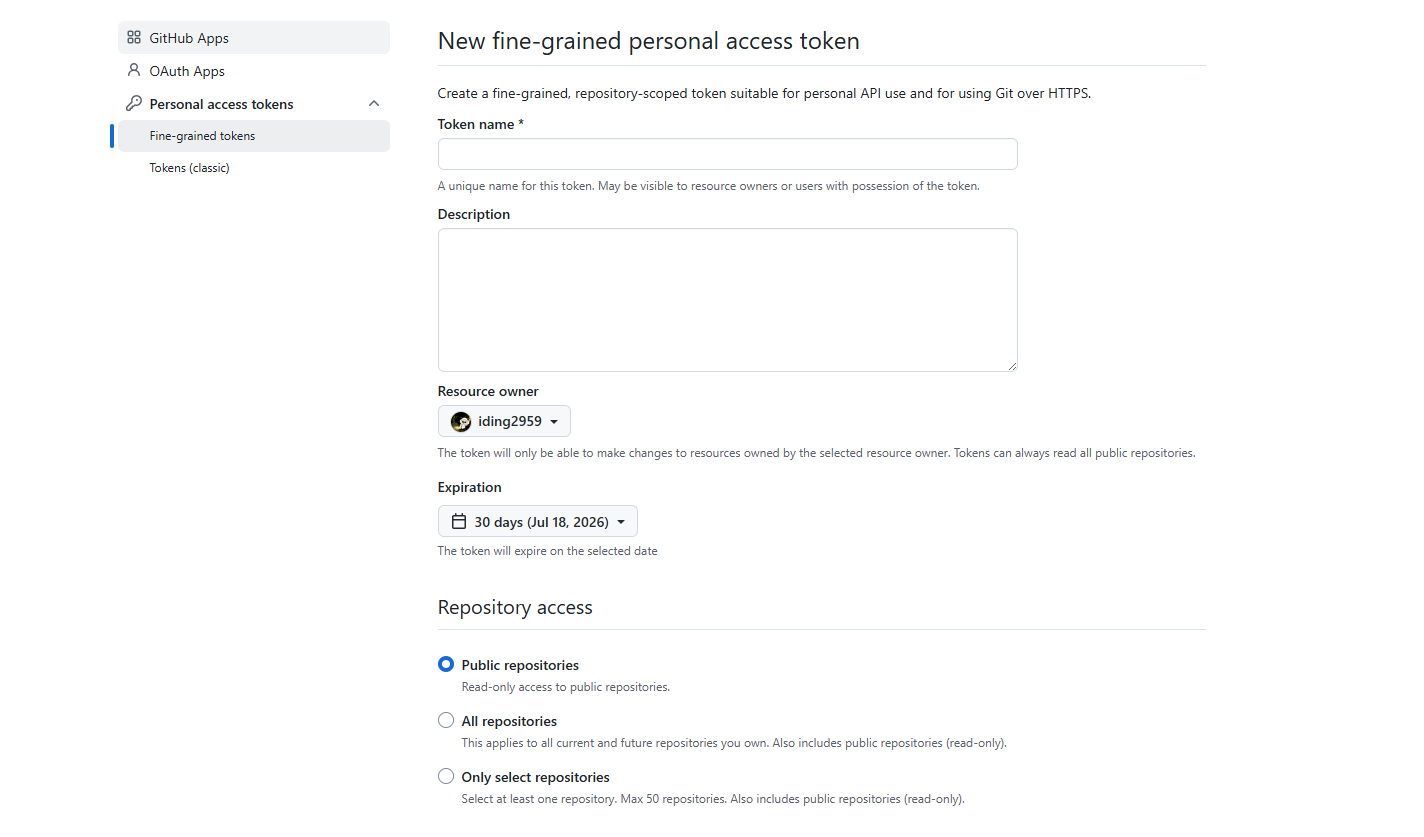
Gitea:
- 访问 设置 → 应用 → 管理 Access Token
- 填写 Token 名称,选择权限范围
- 点击生成并复制
Gitea 生成的 Token 格式类似
a1b2c3...(与 GitHub 的ghp_前缀不同),使用方式完全一致。
第二步:配置 credential.helper
1 | |
第三步:触发保存
执行任意需要认证的 Git 操作(如 git clone 或 git pull):
1 | |
提示输入时:
- Username:你的平台用户名
- Password:粘贴刚才复制的 PAT(不是登录密码!)
输入成功后,凭据自动写入 ~/.git-credentials,后续操作无需再次输入。
⚠️ 请勿输入真实的平台登录密码。store 方式会明文保存,使用 PAT 即使泄露也可以单独吊销。
第四步:验证免密
1 | |
如果推送成功且没有提示输入凭据,说明配置生效。
多仓库 / 多平台配置
~/.git-credentials 支持多行,每个仓库或平台一行:
1 | |
也可以按域名分段匹配,让同一平台的不同仓库共用凭据:
1 | |
Git 会按最长前缀匹配。例如 github.com/user1/repo-a 和 github.com/user1/repo-b 都匹配第一行。
安全风险
store 最大的问题是 明文保存:
1 | |
任何能访问 ~/.git-credentials 的人都能直接看到 Token。因此:
| 场景 | 是否推荐 |
|---|---|
| 个人开发机(仅自己使用) | ✅ 可以使用 |
| 服务器(多人登录) | ❌ 不推荐 |
| 共享电脑 | ❌ 不推荐 |
| CI/CD 环境 | ❌ 应使用环境变量或 Secrets |
更安全的替代方案
如果你的环境不适合明文保存,可以选择以下方式:
Linux — credential-cache(缓存模式)
1 | |
默认缓存 15 分钟,可指定时长:
1 | |
凭据缓存在内存中,不会写入磁盘,超时自动失效。
Linux — libsecret(GNOME 密钥环)
1 | |
凭据存储在系统密钥环中,而非明文文件。
macOS — osxkeychain
1 | |
凭据保存在 macOS 钥匙串中,系统级加密。
Windows — manager-core
1 | |
凭据保存在 Windows Credential Manager 中,不会明文暴露。
删除已保存的凭据
如果不再需要 store 模式或想清除已保存的凭据:
1 | |
Windows 用户:
1 | |
总结
| 方案 | 安全性 | 便利性 | 适用场景 |
|---|---|---|---|
credential.helper store + PAT |
⭐⭐ | ⭐⭐⭐ | 个人开发机 |
credential.helper cache + PAT |
⭐⭐⭐ | ⭐⭐ | 临时使用 / 服务器 |
osxkeychain / manager-core / libsecret |
⭐⭐⭐ | ⭐⭐⭐ | 所有场景(推荐) |
| SSH Key | ⭐⭐⭐ | ⭐⭐⭐ | 所有场景 |
核心原则:不要将登录密码用于 Git 认证,永远使用 PAT 或 SSH Key。 如果环境允许使用系统凭据管理器,优先选择 osxkeychain、manager-core 或 libsecret,它们比 store 更安全。